Overview
New Project Wizard
Export Wizard
Settings
Purchase and Support
Scraper Actions
Scraper actions are the configuration instructions that define a web scraper's behavior, specifying which links to follow and what data to extract. First, specify the URL of the page where you will create the scraper actions (by default, the URL is equal to the URL of the start page). Then, to create a new action, click on the specific link, text, or image on that page, This will open the Scraper Action window, which allows you to specify the action parameters.


Action parameters
| Parameter Name | Description |
|---|---|
| Action Name | Action name. You can use any characters except for []."!'?` |
| Action Type | Select the type of action you want to configure from the list below. |
| Element Position | Defines the unique XPath to locate a specific HTML element on a page. |
| Element Position (alternative) | Defines the secondary XPath for the target element. If the primary XPath is not found, the program will use this alternative XPath to locate the element. |
| Extracted Text | A preview of the text captured from this element. |
| Transformation Script |
A script to transform the extracted text. To generate script, select the specific text you want to extract and
click the "Generate Script"  button.
The program will then create a script and display its result at the bottom of the window.
To edit the script, click the button.
The program will then create a script and display its result at the bottom of the window.
To edit the script, click the  button. button.
|
| Script Result | The result of processing of the Transformation Script. |
| Skip page extraction when the result is empty | If this option is enabled, the scraper will skip the entire page or data row if no text is extracted from this element, ensuring data completeness. |
Action Types
| Action Type | Description |
|---|---|
| Text Extraction Actions | |
| Extract Text | The program extracts the text of the selected element. |
| Extract HTML | The program extracts the HTML text of the selected element. |
| Extract URL | The program extracts the URL of the selected element. |
| Extract All Urls | The program extracts all URLs from the page. Use the 'Exclude URLs' filter to remove matching URLs from the results. |
| Extract Urls Matching Pattern | The program extracts URLs that match the specified pattern. You must define the URL pattern in the "Url pattern" input field. |
| Extract Page Url | The program extracts the current page URL. |
| Extract Page Title | The program extracts the current page title. |
| Extract Current Date | The program adds a timestamp of when the page was processed. |
| Linked Page Actions | |
| Extract Data From Linked Page | The program follows the selected link, extracts data from that new page, and adds it to the data extracted from the current page. |
| Extract Data From Linked Page (custom url) | The program extracts HTML text from the selected element on the current page, then executes a transformation script on that text (this script must return a valid URL string), then follows the resulting URL to a new page, extracts data from that linked page using its own set of actions, and merges this data with the data from the original page into a single output record. |
| Download Actions | |
| Save Image | The program downloads and saves the selected image or file to the image folder. |
| Save Image (custom url) | The program extracts HTML text from the selected element, then executes a transformation script on that text (this script must return a valid URL string), then downloads the image/file from that URL and saves it to the image folder. |
| Save Image (base64 data) | The program extracts base64 data from the selected element and saves the decoded content to the image folder. |
| Save Page Html | The program saves the full HTML code of the current page to a file in the image folder. |
| Save Page Resource Files | The program saves page resource files to the image folder. Resource files are external files like CSS, JavaScript, and images that a browser downloads to build a webpage. |
| Save Download Link Content | The program simulates a click on the selected link to download and save the resulting file to the image folder. |
| Navigation/Crawling Actions | |
| Follow Link | The program extracts all URLs from the page and adds them to the crawl queue for further processing. |
| Follow Link (custom url) | The program extracts HTML text from the selected element, then executes a transformation script on that text (this script must return a valid URL string), then adds the resulting URL to the crawl queue for further processing. |
| Follow All Links | The program extracts all URLs and adds them to the crawl queue for further processing. Use the 'Exclude URLs' filter to ignore matching URLs, preventing them from being crawled. |
| Follow Links Matching Url Pattern | The program extracts URLs that match the specified pattern and adds them to the crawl queue for further processing. You must define the URL pattern in the "Url pattern" input field. |
| Follow Links With Specific Text | The program extracts the URLs of links whose visible text match the specified pattern and adds them to the crawl queue for further processing. You must define the link text pattern in the "Text pattern" input field. |
| Follow Internal Links | The program extracts URLs that point to the same domain and adds them to the crawl queue for further processing. Use the 'Exclude URLs' filter to ignore matching URLs, preventing them from being crawled. |
| Follow External Links | The program extracts URLs that point to a different domain and adds them to the crawl queue for further processing. Use the 'Exclude URLs' filter to ignore matching URLs, preventing them from being crawled. |
| Ignore Links Matching Url Pattern | The program excludes URLs that match the specified pattern from the crawl queue. You must define the URL pattern in the "Url pattern" input field. |
| Ignore Links With Specific Text | The program excludes URLs of links whose visible text match the specified pattern from the crawl queue. You must define the link text pattern in the "Text pattern" input field. |
| Convert Json to Html | The program extracts JSON text from the selected element and converts it into an HTML page for parsing. |
| Convert Shadow Dom Element | The program extracts the hidden dom elements from the selected element. |
| Browser Simulation Actions | |
| Simulate Text Input | The program automatically enters a specific text into the selected input field. You must define the target text in the "Input Value" field. |
| Simulate Selecting List Item | The program automatically selects a specific item from the dropdown list. |
| Simulate Selecting All List Items | The program automatically selects all items from the dropdown list. |
| Simulate Scroll to Element | The program scrolls the page to bring the selected element into view. This action also triggers the loading of any dynamic content that depends on scroll position. |
| Simulate Scroll to Element and Click | The program scrolls the page to bring the selected element into view and then clicks it. This action also triggers the loading of any dynamic content that depends on scroll position. |
| Simulate Scroll Page Down | The program scrolls the page down to load dynamic content that appears on scroll (e.g., infinite scroll pages, 'Load More' sections). |
| Simulate Pause Between Inputs | The program simulates human typing behavior by adding a short, customizable pause between each input action. |
| Simulate User Click (Js) | The program simulates a JavaScript mouse click event on the selected element. |
| Simulate User Click (Real) | The program simulates a native mouse click event on the selected element. |
| Simulate Reload Click | The program simulates clicking the browser's reload button. |
| Simulate Go Back | The program simulates clicking the browser's back button, navigating to the previous page in history. |
Data Row Extraction Settings
If the page data is structured in rows (e.g., a table or list), you must define a loop element.
This tells the scraper how to identify each row so it can automatically extract data from all of them.
The program automatically detects row pattern and suggest a loop element.
You can accept this suggestion or, for precise control, you can also specify or change the loop element manually.
To do it, click the button and select a parent element that contains one complete row of data.
All other elements must be structured as similar sibling elements in the HTML model (see fig. 1).
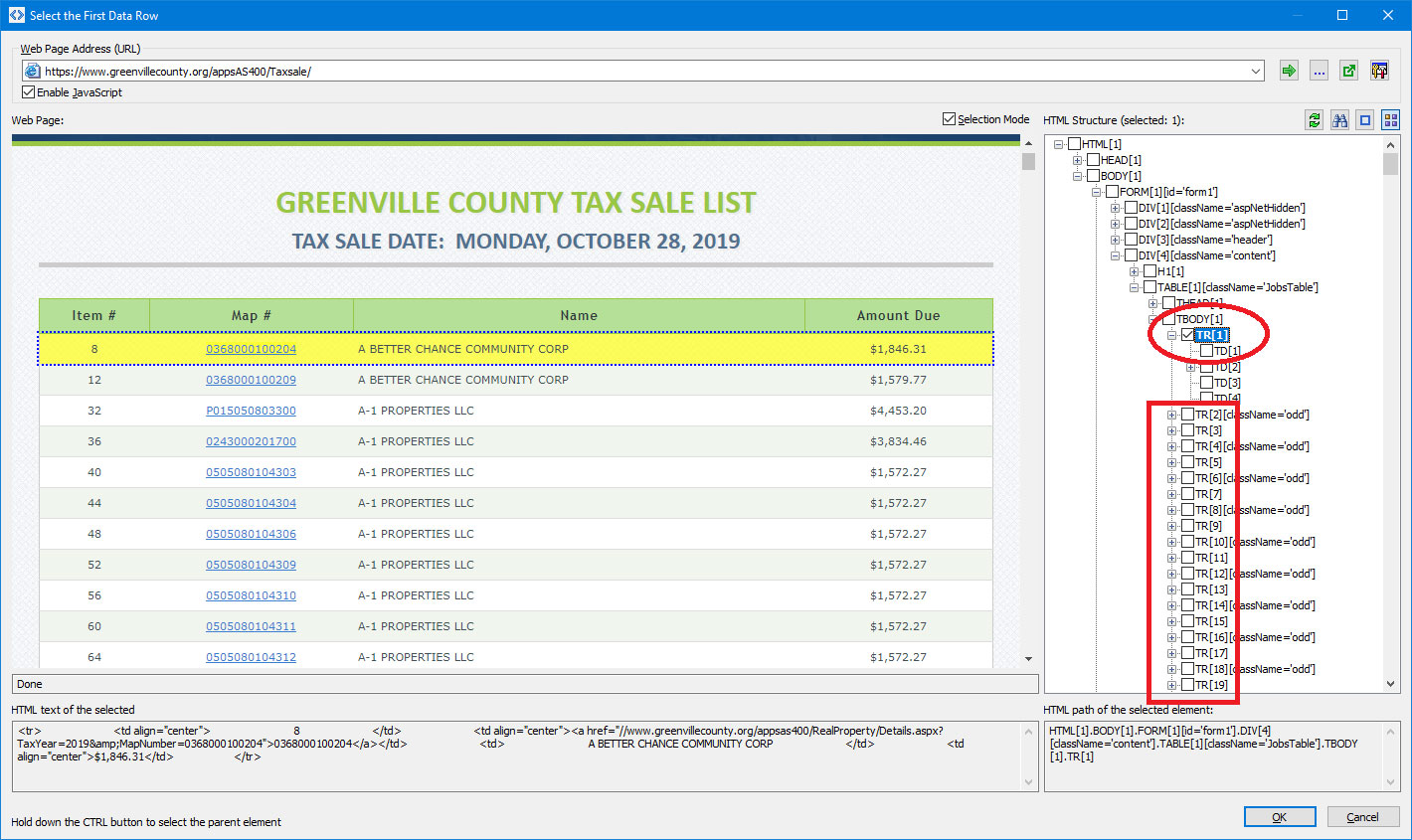
Figure 1.